DAReS Software -- DART

Institute for Mathematics Applied to Geosciences The National Center for Atmospheric Research NCAR
 

The Data Assimilation Research Testbed -- DART

cool
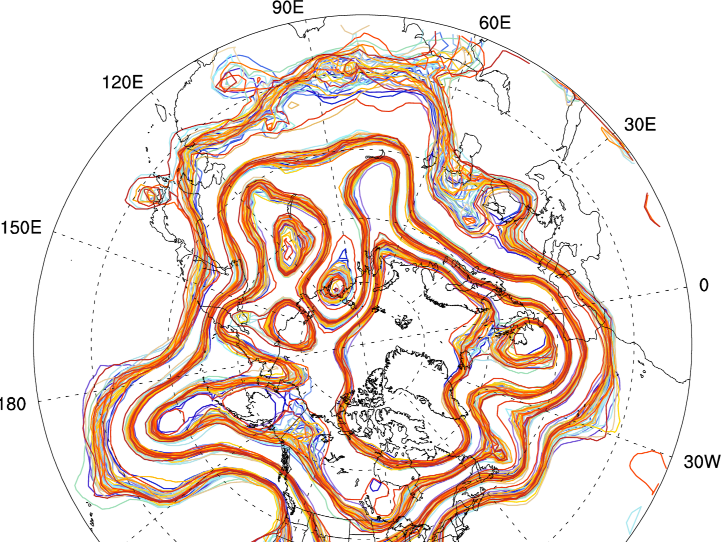
spaghetti plot of North America demonstrating the uncertainty among the
ensemble members
The 500hPa geopotential height from 20 ensemble members of an 80 member experiment with a T85 resolution of CAM (00Z 01 Feb 2003). The contour sets are from 5320 to 5800 by 80.

Welcome to the home page for the Data Assimilation Research Testbed (DART).

Getting Started

The DART software provides a flexible, extensible framework for conducting data assimilation research on a wide variety of models and observations. In order to facilitate the incorporation of new models (which, in the Atmospheric Science community are generally written in F90), the DART software is written primarily in F90. The noteable exceptions are the shell scripts that control execution and the Matlab® diagnostic scripts.

The DART system comes with many models - ranging from 1-dimensional Lorenz systems to the dynamical core of a full atmospheric model. DART also has an extensive tutorial that explains typical DART experiments and explores many aspects of ensemble data assimilation. The tutorial is an entire directory in the DART software distribution, so it can be browsed (it is a series of .pdf files) Download the DART source code and follow the instructions on the web page for the current release for instructions on how to build an executable, run the "workshop" experiments, and look at the results.

DART requirements

DART is intended to be highly portable but has a strong Unix/Linux preference. DART has been run successfully on Windows machines under the cygwin environment. Those instructions are under development - if you would like to be a friendly beta-tester please send me (Tim Hoar) an email and I'll send you the instructions, as long as you promise to provide feedback (good or bad!) so I can improve them. My email is   thoar @ ucar . edu - minus the spaces, naturally. Minimally, you will need a Fortran90 compiler and the netCDF libraries built with the F90 interface. History has shown that it is a very good idea to make sure your run-time environment has the following:

limit stacksize unlimited
limit datasize unlimited

If you want to run your own model, all you need is an executable and some scripts to interface with DART - we have templates and examples. If your model can be called as a subroutine, life is good, and the hardest part is usually a routine to parse the model state vector into one whopping array - and back. Again - we have templates, examples, and a document describing the required interfaces. That document exists in the DART code - DART/models/model_mod.html - as does all the most current documentation. Every(?) DART program/module has a matching piece of documentation.

Starting with the J release, there is an option to compile with the MPI (Message Passing Interface) libraries in order to run the assimilation step in parallel on hardware with multiple CPUs. Note that this is optional; MPI is not required to run the J release. If you do want to run in parallel, then we also require a working MPI library and appropriate cluster or SMP hardware. See the MPI intro for more information on running with the MPI option.

One of the beauties of ensemble data assimilation is that even if (particularly if) your model is single-threaded, you can still run efficiently on parallel machines by dealing out each ensemble member (an unique instance of the model) to a separate processor. If your model cannot run single-threaded, fear not, DART can do that too.

DART tested platforms/models/compilers

DART is intended to be highly portable - and has even run successfully on Windows machines running the cygwin environment. Those instructions are under development and so are not included in the following table. The most current version of DART (Jamaica) has been tested on the following:

hardware O/S F90 compiler batch manager
Intel cluster/SMP/32 bit Red Hat Enterprise Intel 9.0 (build 20051201) none
Intel cluster/SMP/32 bit Red Hat Enterprise GNU Fortran 95 4.1.0 none
Intel Nocona SUSE PGI 6.0-8 LSF
Intel Nocona SUSE Intel 9.1 (EM64T) LSF
Intel iMac Mac OS X 10.4.6 gfortran 4.2.0 Open-MPI
IBM Power 5+ AIX 5.3 XLF 10.1.0 LSF
Intel Fedora Core 4 Intel 9.0 none
PowerBook G4 (PowerPC) Mac OS X 10.4.8 Absoft Pro Fortran 9.0 none
PowerBook G4 (PowerPC) Mac OS X 10.3.9 Absoft Pro Fortran 9.0 Lam
PowerBook G4 (PowerPC) Mac OS X 10.3.9 gfortran 4.2.0 Lam
Intel cluster (Xeon) Fedora Core 2 PGI 6.0-5 PBS
Intel cluster (Xeon) Fedora Core 2 PGI 5.2-4 PBS
Intel cluster (Xeon) Fedora Core 2 Lahey 6.20c PBS
IBM cluster (of opterons) SUSE Enterprise 8 Pathscale 2.4 LSF
IBM cluster (of opterons) Suse Enterprise 8 Intel 9.1 (EM64T) LSF
IBM cluster (of opterons) Suse Enterprise 8 PGI 6.2 LSF
SGI Altix SUSE Linux ES 9.3 Intel 9.1 PBS
SGI MIPS IRIX 6.5 MIPSpro 7.4.3m NQS
Linux cluster Intel Intel 9.1 PBS

DART code distributions

DART is distributed primarily through an anonymous-access readonly SVN repository. This makes updates and comparisons between your sandbox and the latest, greatest version of the code trivially easy. The same cannot be said with a TAR file. If you are not familiar with SVN (the client application of subversion), you should take a stroll through my svn primer If you cannot (i.e. are firewalled out) use svn, please let me know and I'll send you a tarfile ... as a last resort.

Since the DART software is still an area of active research, there are multiple distributions, with more on the way. We'd like to be able to contact people to inform them of any bugs or updates. (This includes local users, BTW!) As you can see by the timetable of distributions, you could expect to get about 2 more emails per year, so PLEASE use a real email address when signing up. I solemnly swear to protect your email address like it is my own!

download instructions for the latest releases.

The Jamaica version of DART (the latest 'official' release) has the following attributes for this file. Since svn uses 'mixed revisions', files in the distribution will have different revision numbers. If you download the 'trunk' (the latest version) - the revision numbers are assuredly different.

Revision: Revision: 2857
Source: URL: http://subversion.ucar.edu/DAReS/DART/trunk/doc/html/index.shtml
Change Date: Date: 2007-04-12 10:44:44 -0600 (Thu, 12 Apr 2007) 

version date instructions most noteable change(s)
jamaica 12 Apr 2007 [doc] vertical localization, extensive testing of MPI implementation, full documentation for new algorithms, new tutorial sections
change log
pre_j 02 Oct 2006 [doc] contains an updated scalable filter algorithm
post_iceland 20 Jun 2006 [doc] observation-space adaptive inflation, bug fixes,
merge_obs_sequence support ...
change log
iceland 23 Nov 2005 [doc] huge expansion of real observation capability
better namelist processing, PBL_1d available.
change log
pre_iceland 20 Oct 2005 for developers only huge expansion of real observation capability
DA workshop 2005 13 June 2005 docs included in distrib. tutorial directory in distribution, observation preprocessing
hawaii 28 Feb 2005 [doc] new filtering algorithms
pre-hawaii 20 Dec 2004 [doc] new filtering algorithms
guam 12 Aug 2004 [doc] new observation modules, removing autopromotion
fiji 29 Apr 2004 [doc] enhanced portability, CAM, WRF
easter 8 March 2004 [doc] initial release

DART Tutorial Materials and Presentations

The DART system comes with an extensive set of tutorial materials, working models of several different levels of complexity, and data to be assimilated. It has been used in several multi-day workshops and can be used as the basis to teach a section on Data Assimilation. Download the DART software distribution and look in the tutorial subdirectory for the pdf and framemaker source for each of the 22 tutorial sections.

Browsing the tutorial directory in the distribution is worth the effort. Taking the tutorial is FAR better!

Presentations about DART:

The FULL list of presentations (as well as some of the presentations themselves) and publications is available on our Publications page. A short list of presentations, posters, and seminars is offered below:

Related Links

DART Contact list

We're a very small group, so the contact list is pretty short. We don't have a central contact email address, but we all know how to forward email to each other. So no matter who you send the email TO, it will find its way to the best person. Pretty cool, eh?

general general platforms/mpi CAM
Jeff Anderson Tim Hoar Nancy Collins Kevin Raeder
jla @ ucar . edu thoar @ ucar . edu nancy @ ucar . edu raeder @ ucar . edu